Quarvenford Platform Functions and User Capabilities
A detailed account of the functions available within the Quarvenford information-organisation service, including how each capability works and what users can accomplish through it.
Four principal capability areas
Quarvenford is structured around four distinct functional areas. Each addresses a different aspect of working with organised digital information, and together they form the complete operational scope of the platform.
Information Classification
The process of assigning submitted information items to appropriate categories within the platform's classification schema. This function forms the foundation of all other activities.
- Assignment of items to predefined category trees
- Support for multiple classification schemas within a single context
- Handling of ambiguous items through escalation to the support team
- Logging of all classification decisions for audit purposes
Structured Review Screens
Once information has been classified, users access it through review screens. These screens present organised views of information items within a selected category or grouping.
- Category-filtered views displaying relevant information items
- Consistent item presentation regardless of information source
- Side-by-side item comparison where supported
- Access to item metadata including classification date and category path
Content Navigation Pathways
The platform identifies structural relationships between information items and presents these as navigable pathways that allow users to move through related content without losing context.
- Relationship links between items in connected categories
- Breadcrumb navigation within deep category hierarchies
- Related-category suggestions based on current view context
- Return paths to parent groupings from any item view
Enquiry and Support Access
Users requiring clarification, assistance with access, or investigation of a classification result can reach the support team through the platform's dedicated enquiry channel.
- Structured enquiry form with request-type categorisation
- Email-based confirmation of enquiry receipt
- Support team review of classification queries
- Guidance on how to structure submissions for optimal classification
How the enquiry and access workflow operates
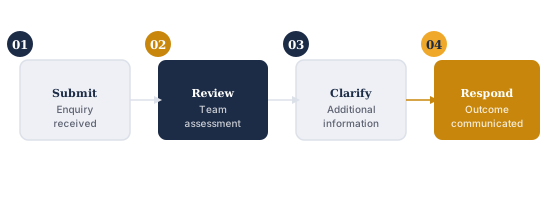
The enquiry workflow is the primary channel through which users request access to Quarvenford or seek support with platform functions. The following steps describe how a typical enquiry moves through the system.
Enquiry Submitted
The user completes the enquiry form on the Enquire page, selecting a request type and providing relevant details. Submission opens a draft email to the support address via the user's email application.
Acknowledgement Sent
The support team acknowledges receipt of the enquiry. If clarifying information is required before the team can proceed, they will indicate this in the acknowledgement.
Review and Assessment
The team reviews the enquiry against the platform's current scope and the user's stated needs. For access requests, this includes assessing whether access is appropriate within the service's operational parameters.
Response Communicated
The user receives a response addressing the enquiry. For access requests, the response will indicate whether access is being progressed, whether further information is needed, or whether the request falls outside the current scope.
Supporting functions that complement the core service
Beyond the four principal capability areas, Quarvenford provides a number of supporting functions that assist users in working effectively with the platform. These are not standalone features but operational elements that enhance the primary classification and review experience.
Classification audit log. The platform maintains a record of classification decisions associated with each submitted information item. This log is accessible to users reviewing the history of a particular item's categorisation, and can be referenced when raising a classification query with the support team.
Contextual help text. Throughout the review interface, the platform includes contextual explanations of classification terms, category definitions, and review screen elements. These explanations are written for users who may be unfamiliar with the platform's classification schema and are displayed alongside relevant interface elements.
Export and reference generation. Users can generate a structured reference summary of items within a review screen. This summary can be used outside the platform to assist with downstream tasks that depend on the organised information.
These supporting functions are available to users as part of normal platform operation and do not require a separate access request. Questions about any of these capabilities can be directed to the support team.
Contact the support team about access
If you would like to request access to Quarvenford or have questions about a specific function, use the enquiry form.